Tiny Planes Multiplayer Guide: Islands, Visits and Rescues
Discover how Tiny Planes multiplayer works: up to 5 players, one island each, flights to friends' airports, and team rescues. Get set up and fly together.
Jump to
How Multiplayer Works in Tiny Planes
Building an airport alone is fun, but watching a friend's jet cross your sky and touch down on your runway is what makes the game feel alive. Tiny Planes multiplayer turns your solo airfield into one stop in a shared archipelago, so the routes you plan, the runways you draw, and the planes you fly suddenly have an audience. If you've been playing solo since launch, here's how to bring your crew along.
Multiplayer arrived with its own update event, which ran from October 29 to November 6, 2026, and it went live a day earlier than planned. The setup is simple. Every player keeps their own island and airport instead of sharing one plot, and you can fly between them.
- Max players per server: 5
- Island setup: each player gets their own island
- What you can do together: explore the islands, fly to each other's airports, and team up on rescues
- Developer: XeroInteractive, with the game listed under Simulation on Roblox
Official page: Tiny Planes (roblox.com)
Setting Up a Server With Friends
The multiplayer menu lets you run up to five airports live at once, and you can also set up your own private server. Once you're in, you'll see planes from other players' airports flying overhead, and you pick an island to call home.
Build your airport before you open it up. Lay down a runway, a taxiway, and a stand first, then invite people over. Set your AI-flown planes to repeat routes before visitors arrive. Your income keeps ticking while you're busy hosting or flying to someone else's island.
Flying to Your Friends' Airports
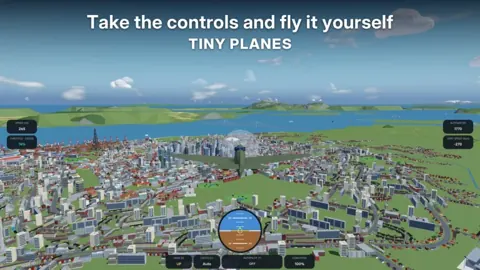
You can fly any plane yourself, so learn the controls before heading to a friend's island. Press C in-game at any time to bring up the full list.

| Key | Action |
|---|---|
| Shift / Ctrl | Throttle up / throttle down |
| W / S | Nose up / nose down |
| A / D | Roll left / right |
| Space | Brakes |
| Mouse | Look around |
| L | Landing gear |
| T | Autopilot (pick a field) |
| M | Map |
| V | Camera |
| H | Hide UI |
Use T for autopilot on long hops. You choose the field you want, and the plane handles the trip while you check the map with M. The roll on small planes is sensitive, so make gentle A/D inputs on approach. Don't forget L to lower your gear before you touch down on a friend's runway.
Friends' airports also work as landing sites when you're out exploring. Land at a friend's field when you're far from home instead of always racing back to your own island.
Teaming Up on Rescues
The multiplayer update lets you team up with friends on rescues. The Extreme Weather update hit the islands with tornadoes, hurricanes, earthquakes, tsunamis, wildfires, volcanic eruptions, and meteor strikes. When the sirens go off, players respond, and emergency jobs pay big and come with exclusive rewards.

Four careers tie into these events, and ranking them up unlocks better aircraft and bigger payouts:
- Firefighting: put out wildfires
- Search & Rescue: pull people out before it's too late
- Evacuation & Relief: one of the four new career tracks
- Storm Chasing & Recon: chase storms, drop sensor probes near tornadoes, even fly into the eye of a hurricane
Split the roles when a disaster strikes. Have a friend fly a firefighting plane while you run search and rescue in something like the UH-60 Black Hawk. It carries 11 seats and a rescue hoist, and it goes anywhere.
Building an Airport Worth Visiting
The Building Rework event runs from November 11 to November 28, 2026. It brings a fully redesigned build mode, which matters most when other pilots are landing at your field. Here's what it adds:
- Drag taxiways, roads, and paths with smooth curves at any angle. Junctions and runway entries connect automatically.
- Build runways of any length and angle, and let them cross.
- Snap together terminal piers and concourses with gates on both sides, plus self-fitting jet bridges.
- Set up one-way taxiways, runway roles, and hold points to control traffic.
- Use copy and paste, undo, a snap toggle, and save slots for different layouts.
Everything you've already built stays as it is, so you don't have to start over. Use one-way taxiways and hold points to control how your planes taxi once friends start visiting regularly. Runways can sit at any angle, so line them up however suits your island.
FAQ
How many players can join a Tiny Planes server?
Up to 5 players per server, and each one runs their own island and airport.
Do players share one airport in multiplayer?
No. Everyone keeps their own island. You team up by flying to each other's airports and working disaster rescues together.
Can I play multiplayer on a private server?
Yes. The multiplayer menu offers your own private server, so you can keep the session to just your friends.
Continue with
 Tiny Planes Create Guide: Build Your Dream Airport FastOur Tiny Planes create guide covers curved runways, jet bridge gates, custom part building, Freebuild, and a 150+ real aircraft fleet across four islands.
More in Features
Tiny Planes Disaster Rescues: Careers, Jobs and Team Tips
See how Tiny Planes disaster rescues work, from tornadoes and wildfires to the four emergency careers, plus tips for teaming up with friends on rescues.
Tiny Planes Extreme Weather Update: Disasters and Careers
The Tiny Planes extreme weather update brought tornadoes, wildfires, 4 disaster careers and 28 new aircraft. Discover how emergency jobs and ranks work.
Tiny Planes Features Guide: Build, Fly, and Grow Your Fleet
Our Tiny Planes features guide covers airport building, 150+ real aircraft, dispatch routes, autopilot, codes, and game passes. Build your dream airfield.
Tiny Planes Fun Game Mode Guide: Build, Fly, and Rescue
Discover the Tiny Planes fun game mode options on Roblox: build airfields, fly 150+ real aircraft, run disaster rescues, and team up with friends today.
Continue exploring
Join the community
Official channels for news, updates and player help: